


VibeoFlix
1.826.00 Reviews
App Specs
- Version
- 1.1.5
- Updated On
- License
- Free
- Downloads
- 50,000+
- Developer
- Moba Naki
- Categories
- Entertainment
- Platform
- Android
Screenshots

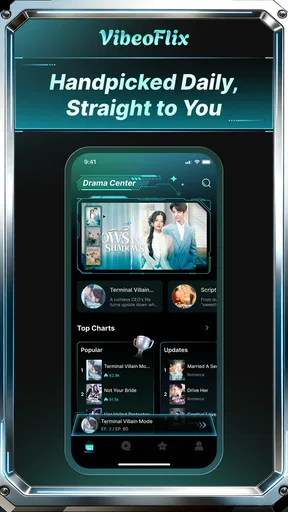

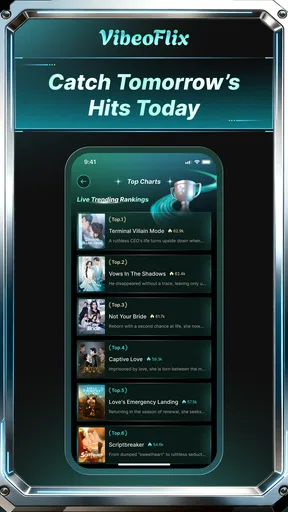
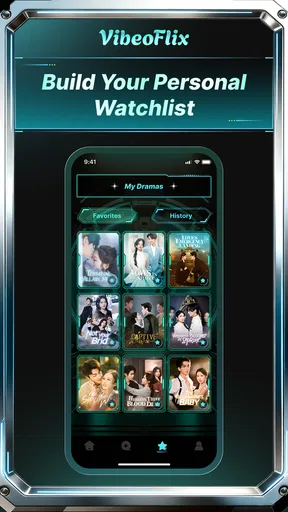
 Analysis by AppCompare
I spent time with VibeoFlix as a quick entertainment app built around mini-dramas, and my first impression was very specific: it is designed for short bursts of attention rather than a long evening of traditional television. That makes it easy to understand, but it also means the value depends heavily on whether you enjoy compact, serialized stories and are comfortable making careful choices around purchases and personal data.
The app comes from Moba Naki and is available free of charge for users aged Everyone. It has passed the fifty-thousand-install mark, although its current average is only 1.8 from 68 ratings and 26 reviews. I would not treat that score as a complete verdict on the experience, but I would take it seriously as a reason to approach the app with modest expectations rather than assuming it will replace a full streaming service.
How VibeoFlix fits into everyday viewing
The clearest use case is a small gap in the day. I can imagine opening it while waiting for an appointment, riding public transport, or taking a short break when I want a story but do not want to commit to a feature-length film. The mini-drama format suits that situation because the barrier to starting is low. You are not choosing a large library and planning an evening; you are looking for something that can occupy a few spare minutes.
That convenience is also the app’s main limitation. Short episodes can make a story feel immediate, but they leave less room for slow character development, atmosphere, or complicated subplots. If I want a carefully paced series, a conventional streaming platform is usually the better choice. If I want a quick dramatic hook and a lightweight viewing session, this format makes more sense.
I found it useful to treat the app as a snack rather than a meal. That mindset prevents disappointment. Someone expecting the depth of a long-form drama may find the experience thin, while someone who enjoys quick cliffhangers may appreciate the compact structure. The store summary presents it as a way to lose yourself in mini-drama when you have minutes to spare, and that basic idea accurately describes where it belongs in my routine.
The app is currently listed as version 1.1.5 and supports Android 7.0 or later. That broad compatibility is helpful if you use an older phone, but compatibility alone does not tell me how comfortable the app will feel on every device. Screen size, connection quality, and battery condition can all affect short-form video more noticeably than they affect a simple reading or utility app.
What I would use it for
My preferred workflow would be to open it only when I have a defined window of time. Instead of browsing indefinitely, I would choose a drama, watch a manageable portion, and close the app before the session turns into aimless scrolling. This is a small habit, but it matters with entertainment products that are built to make the next piece of content feel immediately available.
Worth Reading Before You Choose

EA SPORTS FC Mobile 26 Is a Bigger Football Game, but It Takes Time

Flipboard Shows What News Apps Must Do Beyond the Feed

Switching to Android Auto Means Rethinking Your Driving Routine

Google Calendar Makes a Crowded Week Easier to Manage

Ludo King Makes the Most of the Minutes Between Plans

Baby Panda World Brings Quick Play to Modern Phones, but Its Game Library Feels Busy
A realistic example is a ten-minute lunch break. I might use the first minute to select a story, watch until the break ends, and leave rather than continuing into an unplanned session. That approach gives the app a clear purpose and makes it easier to judge whether the short-episode format is genuinely useful to me. It also reduces the chance of making a rushed purchase simply because I want to continue a story immediately.
Another practical use is sharing the app with a family member who likes dramatic fiction but does not want to learn a complicated interface. The Everyone age classification makes it broadly approachable from a content-rating perspective. Still, I would make the viewing decision personally rather than assuming that the age label guarantees that every individual story will suit every household preference.
Trust starts with what the app lets me verify
When I review an entertainment app, I separate visible facts from assumptions. With VibeoFlix, the useful starting points are its developer identity, its store-facing version information, its age classification, its free download model, and the presence of in-app purchases. Those details help me understand the commercial shape of the product, but they do not by themselves prove how the app handles every piece of information on a device.
I would therefore check the permission prompts on my own phone rather than relying on a general expectation about video apps. I would also read the privacy and account screens presented during setup, if any appear, before accepting them quickly. The important habit is simple: trust should come from visible choices and understandable controls, not from the entertainment category alone.
The low average rating adds another reason to slow down. Ratings can reflect performance, content preferences, billing frustration, or problems specific to certain devices, so I would read recent comments before committing time or money. I would look especially for repeated complaints about access, unexpected charges, intrusive prompts, or difficulty removing an account. Those are more useful signals than a single enthusiastic or angry review.
I also would not confuse the free price with a completely cost-free experience. The app can offer in-app purchases ranging from $6.99 to $299.99 per item. That is a wide enough range to make purchase awareness essential, particularly if a phone is shared with children or family members. I would keep purchase authentication enabled and avoid saving a payment method casually if I only intend to sample the service.
Controls I would check before settling in
My first check would be whether I can use the app without creating an account, or whether an account becomes necessary for continuing a story. I would look for a clear sign-in method, a way to log out, and an understandable route for managing or deleting the account if one is created. I would not invent a promise about those controls; I would judge them from the screens actually shown on my device.
Next, I would inspect the operating system’s permission manager after installation. If a permission is requested, I would ask whether it is relevant to watching mini-dramas. A video app may reasonably need network access, but any additional request deserves a closer look. I would deny anything that does not match my intended use and then see whether the core viewing experience still works.
Notifications deserve the same attention. A drama app may use reminders to bring me back, but I prefer to decide when entertainment interrupts my day. If notification controls are available inside the app or in Android settings, I would turn off promotional alerts while keeping only the reminders I actually want. This is one of the easiest ways to make the experience feel less demanding without abandoning it.
I would also review the purchase flow before watching deeply. The key questions are whether the price is shown before confirmation, whether the wording clearly distinguishes free viewing from paid access, and whether the system asks for a final confirmation. I would never tap through a locked episode automatically. A pause at that moment can prevent an accidental charge and makes the commercial model easier to understand.
Data-sensitive moments during normal use
The most sensitive moments are usually not the opening screen but the points where the app asks for an account, payment, permissions, or notification access. Those moments deserve more attention because they can change the relationship between a casual viewer and the service. I would handle them one at a time instead of accepting every prompt in a single setup session.
If VibeoFlix asks me to register, I would use only the information needed for the account and avoid adding personal details that do not improve viewing. I would choose a unique password if a password is required, and I would keep track of which email address is connected. That makes later account management less confusing, especially if I decide the app is not for me.
Payment is the area where I would be most deliberate. Because the app is free to install but includes paid items, I would verify the purchase amount on the platform confirmation screen every time. I would not assume that a previous unlock applies to every drama, and I would not buy credits or access simply to avoid a cliffhanger. The better test is whether I am still interested after closing the app and returning later.
On a shared device, I would use the operating system’s purchase authentication and make sure children cannot confirm transactions without permission. The Everyone rating describes the broad content classification, not a guarantee that every purchasing situation is harmless. Separating content access from payment authority is a practical safeguard that costs little effort.
Network use is another everyday consideration. Short-form video can consume attention and connectivity quickly, especially when played repeatedly. I would watch my mobile-data settings and prefer Wi-Fi when possible. If the app offers playback or download choices, I would inspect them rather than assuming they exist. If it does not offer such controls, I would keep sessions short when away from Wi-Fi.
Keeping control of the viewing experience
User agency matters because the app’s format can encourage rapid continuation. My advice is to decide in advance what a successful session looks like: one episode, a fixed time, or a single storyline. That boundary is more reliable than waiting until I feel finished, particularly when each segment is designed to leave a reason to continue.
I would also keep a simple note of any paid access I choose. The note does not need to be complicated; recording the drama, date, and amount is enough to make later checking easier. If the app uses a credit-style system, I would pay attention to what the credit unlocks and whether the wording is clear before confirming. The practical trade-off is that this adds a few seconds, but it protects me from treating an abstract balance as if it were free.
For privacy, I would periodically revisit Android’s permission dashboard and notification settings instead of checking them only during installation. Permissions can become easy to forget once an app becomes part of a routine. I would keep only what supports the way I actually use VibeoFlix and remove access that no longer seems necessary.
If I stopped using the app, I would first cancel any recurring arrangement shown in the platform’s subscription controls, if one exists, and then remove stored account or payment information through the available settings. I would not rely on uninstalling alone as a universal account-management step. Uninstalling removes the local app, but it is not automatically the same as closing an online account or ending a billing relationship.
Where it beats ordinary alternatives, and where it does not
Compared with a general streaming service, VibeoFlix has a narrower promise: quick mini-dramas rather than a broad entertainment library. That focus can be an advantage when I want something immediate and lightweight. A traditional service is usually stronger for films, longer episodes, established discovery tools, profiles, and a planned viewing session.
Compared with free video platforms, the difference is more about structure than convenience. A general video platform may offer more variety and familiar creator-driven content, while this app’s appeal is the possibility of staying within a mini-drama experience. I would choose the alternative if I wanted tutorials, news, music, or unrelated clips. I would choose VibeoFlix only when the compact drama format itself is what I want.
Compared with reading short fiction, the app offers a more immediate visual and dramatic experience, but it gives me less control over pace and imagination. Reading is often better when I want quiet, offline concentration. VibeoFlix is better suited to a visual break where I want the app to carry the presentation for me.
The commercial trade-off is important in all three comparisons. A free download lowers the barrier to trying it, but the in-app purchase range means the cost can rise sharply if I chase multiple locked items. For that reason, I would not recommend it to someone seeking a predictable entertainment budget unless that person is comfortable using the app only within clearly defined free access.
Who should try it and who should skip it
I would recommend giving it a cautious trial to people who enjoy short dramatic stories, have small pockets of free time, and are willing to manage notifications and purchases actively. It may also suit viewers who find large streaming catalogs tiring and prefer a focused, bite-sized format.
I would skip it if I want a full-length television replacement, dependable offline viewing, a large selection of unrelated entertainment, or a clearly predictable cost before watching. I would also be cautious if I dislike cliffhanger-driven formats or if I tend to make impulse purchases when content is locked. In those cases, a conventional service with a known plan or a free platform with no paid episode pressure may be a better fit.
The rating of 1.8 is not something I can ignore, especially alongside the relatively small review sample. It does not tell me exactly which problem affected each reviewer, but it does make a test-first approach sensible. I would install it, inspect the controls, watch enough to understand the format, and avoid paying until the experience proves useful in my own routine.
My cautious verdict after testing the concept
VibeoFlix has a clear place: it is a free entertainment app for mini-dramas and short viewing sessions, not a universal streaming replacement. I like the simplicity of that idea, and I can see myself using it during a brief wait when I want a story with more structure than random scrolling.
At the same time, I would keep my expectations and spending controlled. The low average rating, the broad in-app purchase range, and the need to verify permissions, account handling, notifications, and purchase prompts all point toward a careful trial. The app’s age classification is Everyone, but responsible use still depends on the choices made around accounts, devices, and payments.
My recommendation is therefore conditional: try it if mini-dramas genuinely match your viewing habits, but treat the free installation as an invitation to evaluate rather than a reason to buy. Check every prompt, protect purchase confirmation, and decide whether the short format adds something to your day. For me, the right way to use VibeoFlix is as a controlled few-minute diversion, not as an open-ended streaming commitment.
Pros
- Simple interface makes browsing videos quick and straightforward.
- Offers a varied selection of short-form entertainment content.
- Video playback is generally smooth on stable internet connections.
- Personalized suggestions can help users discover new videos.
- Useful search tools make finding specific content easier.
Cons
- Some content may be unavailable depending on your region.
- Frequent ads can interrupt browsing or video playback.
- Recommendations may become repetitive after extended use.
- Streaming quality can drop noticeably on slower connections.
- The app may require considerable storage for cached content.
FAQs for VibeoFlix
What is VibeoFlix and what can I use it for?
VibeoFlix is an entertainment-focused video application designed for discovering and watching digital content in a convenient mobile interface. After exploring the app, I found that its main appeal is the way it organizes videos for quick browsing, with categories and recommendations intended to help users find something interesting without spending too much time searching. The exact catalog and available features may vary by region and app version.
Is VibeoFlix free to download and use?
VibeoFlix may be available to download at no initial cost, but users should check the official Google Play Store or Apple App Store listing for the current pricing model before installing it. Some content or functions may require a subscription, one-time payment, advertising support, or in-app purchases. I recommend reviewing the subscription terms, renewal conditions, and payment details carefully so there are no surprises after starting a trial or paid plan.
Does VibeoFlix require an internet connection?
An internet connection is generally needed to browse the catalog, load recommendations, stream videos, and synchronize account information in VibeoFlix. Performance depends on the quality and stability of your Wi-Fi or mobile data connection. If the app supports offline viewing, downloaded videos may be watched without continuous internet access, although some titles can have expiration limits, download restrictions, or licensing conditions that users should verify inside the application.
Is VibeoFlix available for both Android and iPhone?
Availability can depend on the country, operating system, and current distribution status of the application. Before downloading VibeoFlix, search for its official listing in Google Play for Android devices or the App Store for iPhone and iPad. Check the developer name, supported operating-system version, permissions, and recent update date to avoid installing an unofficial or similarly named application from an unverified source.
Is VibeoFlix safe for children and suitable for all audiences?
VibeoFlix should not automatically be considered suitable for every age group because video platforms can contain content with different themes, language, or maturity levels. Parents should review the app’s age rating, privacy policy, content descriptions, and available parental-control options before allowing children to use it. It is also worth checking whether the service collects viewing data, displays targeted advertising, or permits interaction with other users.


